

For UK players, creating an account at an offshore casino carries practical implications that extend well beyond filling in a standard form. Kikibet operates under an Anjouan Offshore Gaming Authority licence rather than a UK Gambling Commission licence, which means the verification standards, account protection framework and dispute resolution routes available to players differ materially from those of UKGC-regulated domestic operators. Knowing these distinctions before starting the registration process is the most effective way to manage expectations around account activation, KYC timelines and withdrawal eligibility from the outset.
The Kikibet sign-up process is structured in clear stages: initial form completion, email confirmation, and identity verification before the first withdrawal is permitted. While the registration form itself takes under two minutes to complete, full account functionality — including the ability to withdraw funds — depends on completing the KYC process, which requires submitting identity and address documents. Players who prepare these documents before registering are in a materially better position to avoid delays when their first withdrawal is requested.
Account creation at Kikibet is available on both desktop and mobile, with an additional option to register using an existing Google or Apple account rather than an email-and-password combination.

What to Prepare Before Creating a Kikibet Account
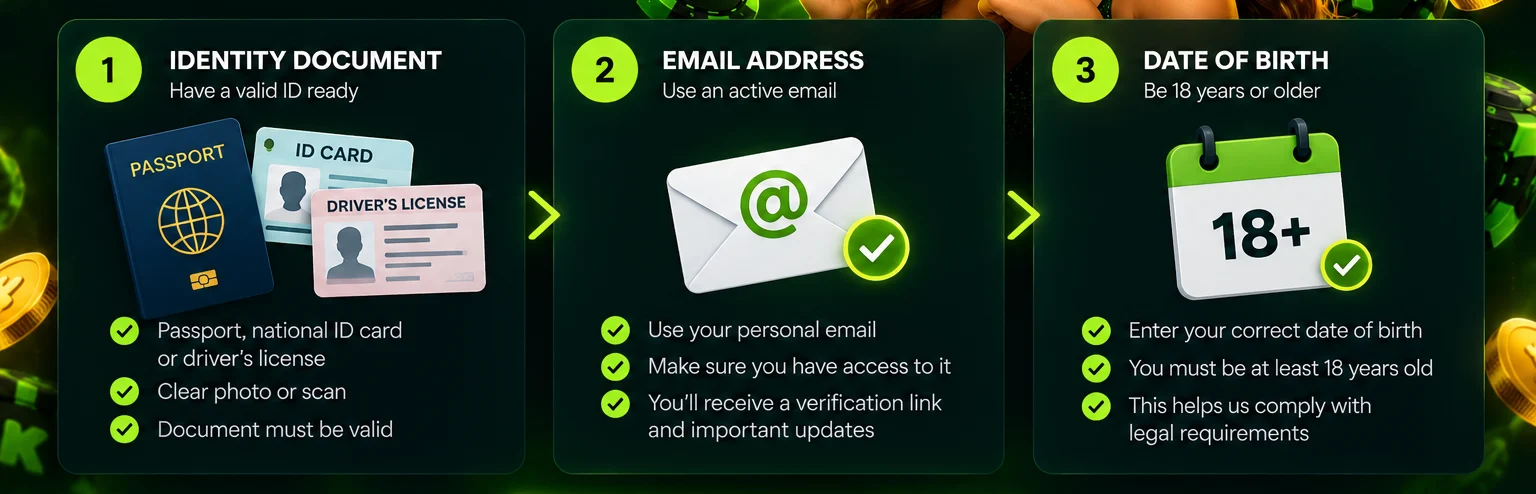
Before initiating the registration process at Kikibet, players benefit from gathering the information and documents required at each stage. The sign-up form itself asks only for basic personal details, but the KYC identity verification process that follows — triggered at the point of the first withdrawal — requires official documentation that is not always immediately to hand. Preparing both sets of requirements before starting registration removes the most common sources of friction: form rejection caused by mismatched personal details, and withdrawal delays caused by missing or expired documents at the verification stage.
The sequence from registration to a fully verified, withdrawal-enabled account at Kikibet is straightforward when approached with accurate information from the outset. Players who treat account creation as a two-stage process — initial sign-up followed by document preparation for KYC — are consistently better positioned than those who encounter the verification requirement only when attempting to withdraw funds for the first time.
Personal Information Required During Registration
The Kikibet sign-up form collects a standard set of personal details used to create the account record and, subsequently, to match against the identity documents submitted during KYC verification. Players are required to provide their full legal name as it appears on their identity document, date of birth, residential address, email address, and a contact phone number. A password is set during this stage; the platform enforces minimum complexity requirements, and players who opt for the Google or Apple authentication route bypass the password step entirely.
The name, address and date of birth entered on the registration form must match exactly the information on the identity documents that will later be submitted for KYC. Discrepancies between registration data and submitted documents are among the most frequent causes of verification delays at offshore operators. Accurate data entry at the registration stage directly accelerates the KYC process when it is initiated.
"KYC delays at offshore platforms are overwhelmingly attributable to mismatched personal data at the registration stage rather than document quality — it is a preventable problem in most cases." — identity verification analyst, 2026.
Age and Residency Eligibility for UK Players
Kikibet enforces an 18+ age requirement consistent with its obligations under the Anjouan Offshore Gaming Authority licence. Players who register before their eighteenth birthday are not permitted to hold an active account, and the KYC process will identify and close any account where submitted identity documents confirm the holder is under 18 at the time of registration.
For UK residents, Kikibet does not apply a country restriction — the platform accepts players from the United Kingdom. As an Anjouan-licensed offshore operator, however, Kikibet falls outside the UK Gambling Commission's regulatory framework. UK players are therefore outside the statutory consumer protection provisions that apply to UKGC-licensed sites — including GamStop integration, independent dispute resolution through IBAS or eCOGRA, and affordability-based account controls. This does not affect the registration process itself, but it is a material consideration for any UK player evaluating the platform.
How to Register at Kikibet: Full Step-by-Step Process
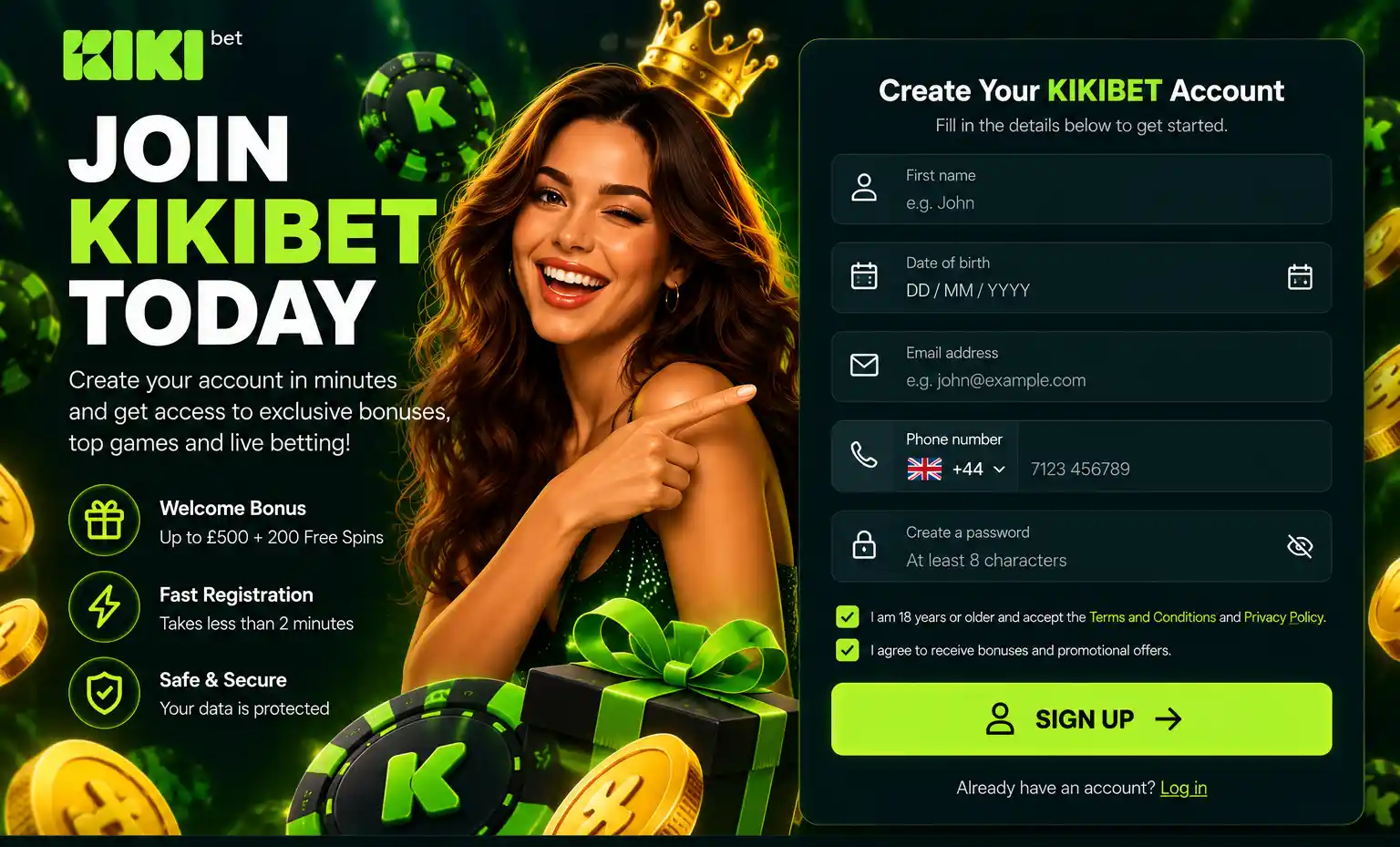
The Kikibet registration process is accessible from the main navigation on both desktop and mobile, with a "Register" button positioned in the site header. The form follows a single-page sequence covering personal details, contact information and credential setup, concluding with age eligibility confirmation and acceptance of the terms and conditions. For players who prefer not to manage a separate email-and-password combination, account creation is also available through Google and Apple authentication, which pre-populates the form with information from the linked account.
Players signing up via a third-party authentication route — Google or Apple — complete a shorter process, as the platform draws the name and email from the linked account automatically. Regardless of the authentication method chosen, all new accounts are subject to the same KYC verification requirements before the first withdrawal is processed.
"Offshore operators that remove unnecessary steps from the registration flow consistently see higher first-deposit conversion rates — and Kikibet's multi-method sign-up reflects that understanding." — iGaming platform analyst, 2026.
- Visit kikibet.com and click "Register" in the site header.
- Select the preferred registration method: email and password, Google account, or Apple account.
- Complete the registration form with full legal name, date of birth, residential address, email address and phone number.
- Create a password that meets the platform's minimum complexity requirements (applicable to email registration only; Google and Apple authentication routes bypass this step).
- Confirm age eligibility (18+) and accept the terms and conditions and privacy policy.
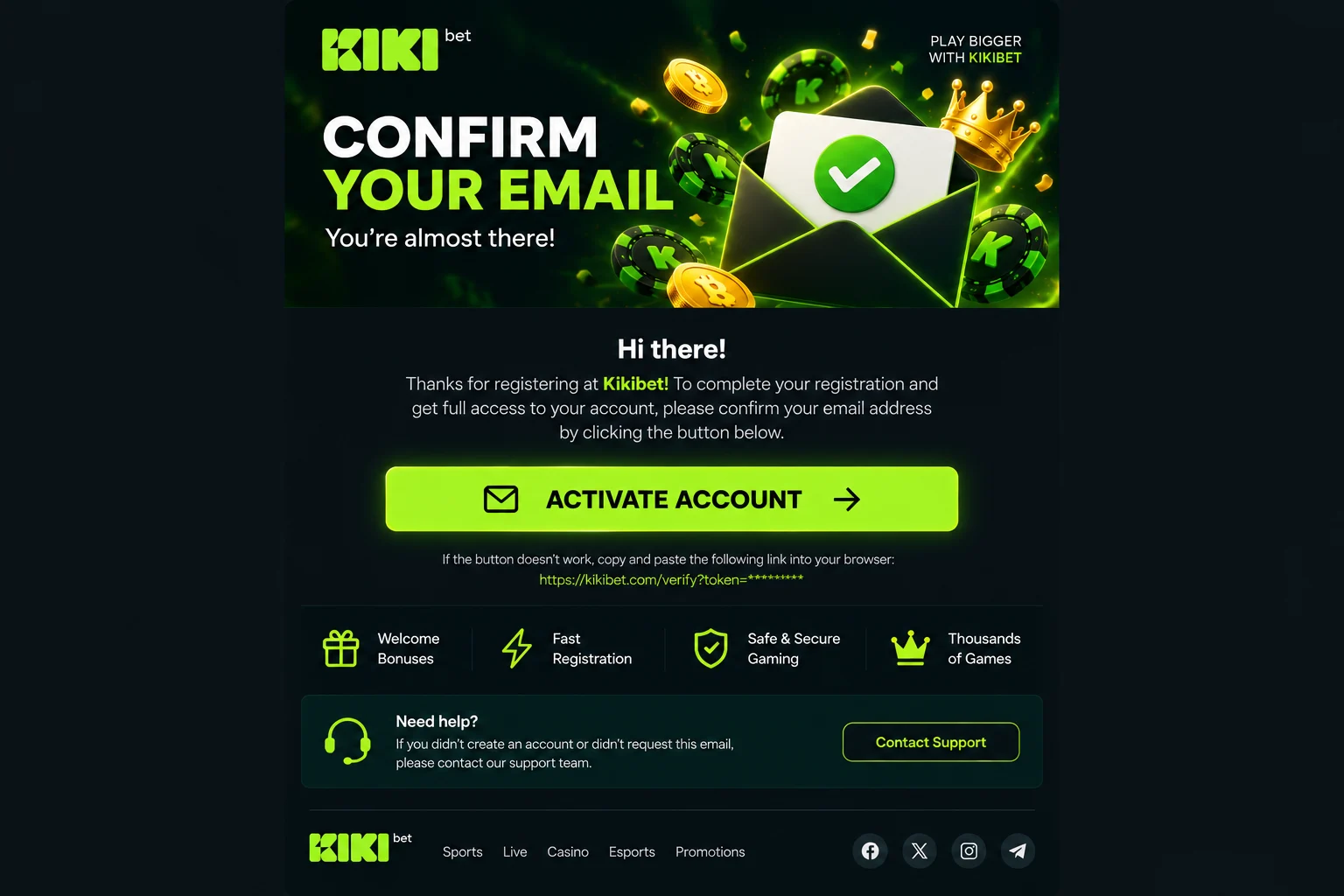
- Submit the form. Kikibet sends a verification email to the address provided.
- Click the verification link in the email. The account is activated and the full casino and sportsbook catalogue becomes accessible immediately.
Completing the Sign-Up Form
The sign-up form at Kikibet is structured in logical sections — contact details, personal information and credential setup — which the player moves through in sequence. All fields marked as mandatory must be completed before the form can be submitted; leaving optional fields blank does not prevent account creation. The platform performs a format check on the email address and phone number fields at submission, flagging entries that do not conform to expected patterns before the form is processed.
Players using the Google or Apple authentication route will find the form partially pre-populated with the name and email address associated with their linked account. These fields can be edited before submission if the pre-populated data does not match the player's legal name or preferred contact details. As with manual registration, the name and date of birth entered on the form must correspond exactly to the player's official identity documents to avoid complications at the KYC stage.
Email Confirmation and First Login
Following form submission, Kikibet sends an automated confirmation email to the address provided during registration. The email contains a verification link that, when clicked, activates the account and redirects the player to the platform. The verification link is time-limited — if not accessed within the specified window (typically 24 to 48 hours), the link expires and a new confirmation email must be requested through the account portal.
After email confirmation, the player accesses the account using the registered email address and password, or via the Google or Apple route selected during sign-up. At this point the account is active and the full casino and sportsbook catalogue is accessible from a single shared session. Withdrawal functionality remains restricted until KYC identity verification is completed — the required documents, accepted formats and timelines are addressed in the following section.

KYC Verification at Kikibet: Documents and Timelines
KYC (Know Your Customer) verification is the identity confirmation process that licensed gambling operators are required to conduct before releasing player funds. At Kikibet, the check is not mandatory at the point of registration — the account is activated and fully playable following email confirmation — but it becomes a prerequisite before any withdrawal is processed. This approach is standard among offshore operators and means players can access the platform immediately after sign-up, while the verification obligation surfaces at the point of cashout.
The practical consequence for UK players is direct: any funds accumulated in the account cannot be withdrawn until identity and address verification is completed to Kikibet's satisfaction. Initiating the KYC process proactively — by submitting documents shortly after registration rather than waiting until a withdrawal is requested — is the approach that most consistently avoids delays when funds need to be released.
Identity and Address Documents Accepted
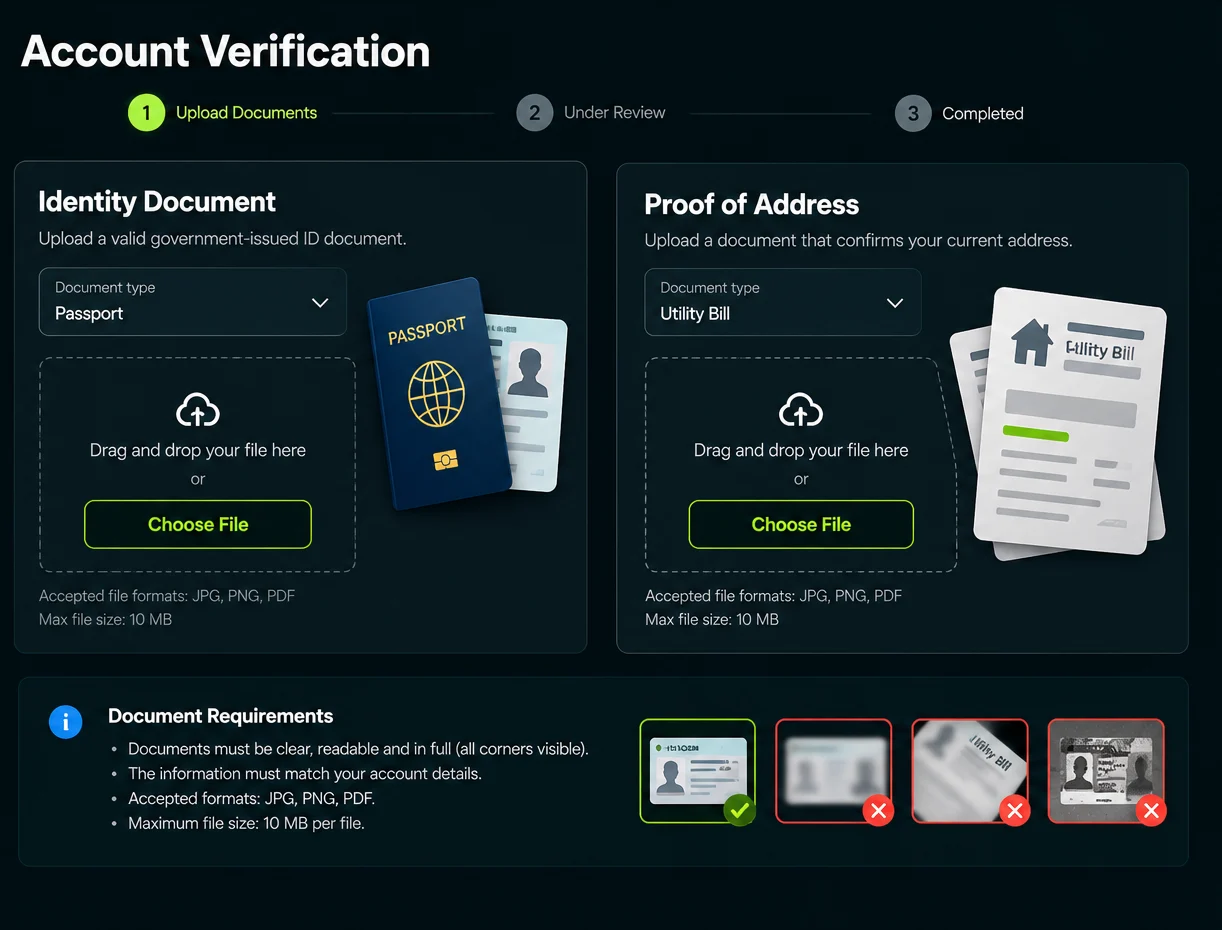
Kikibet's KYC process requires two categories of documentation: proof of identity and proof of address. Both documents must be current, clearly legible and — in the case of the identity document — must show a name and date of birth that match exactly the details submitted during registration. Documents that are expired, partially obscured or show a name differing from the registration record will be rejected, requiring resubmission and extending the verification timeline.
| Document Category | Accepted Documents | Key Requirements |
|---|---|---|
| Proof of Identity | Valid passport, national identity card, or driver's licence | Photo page clearly visible; name and date of birth must match registration data exactly; document must not be expired |
| Proof of Address | Utility bill (gas, electricity, water), bank statement, or official government letter | Issued within the last 90 days; full legal name and residential address must match registration data |
| Payment Method Verification | Card copy (first 6 and last 4 digits visible, middle 6 obscured), or e-wallet account screenshot | Required where the platform requests additional payment verification; applicable on a case-by-case basis |
The platform accepts document uploads in standard image formats (JPEG, PNG) and PDF. Mobile photographs of physical documents are generally accepted provided the image is in focus, well-lit and shows all four corners of the document without cropping. All submitted documents are subject to Kikibet's data handling and privacy terms as published on the platform.
When Verification Is Triggered and How Long It Takes
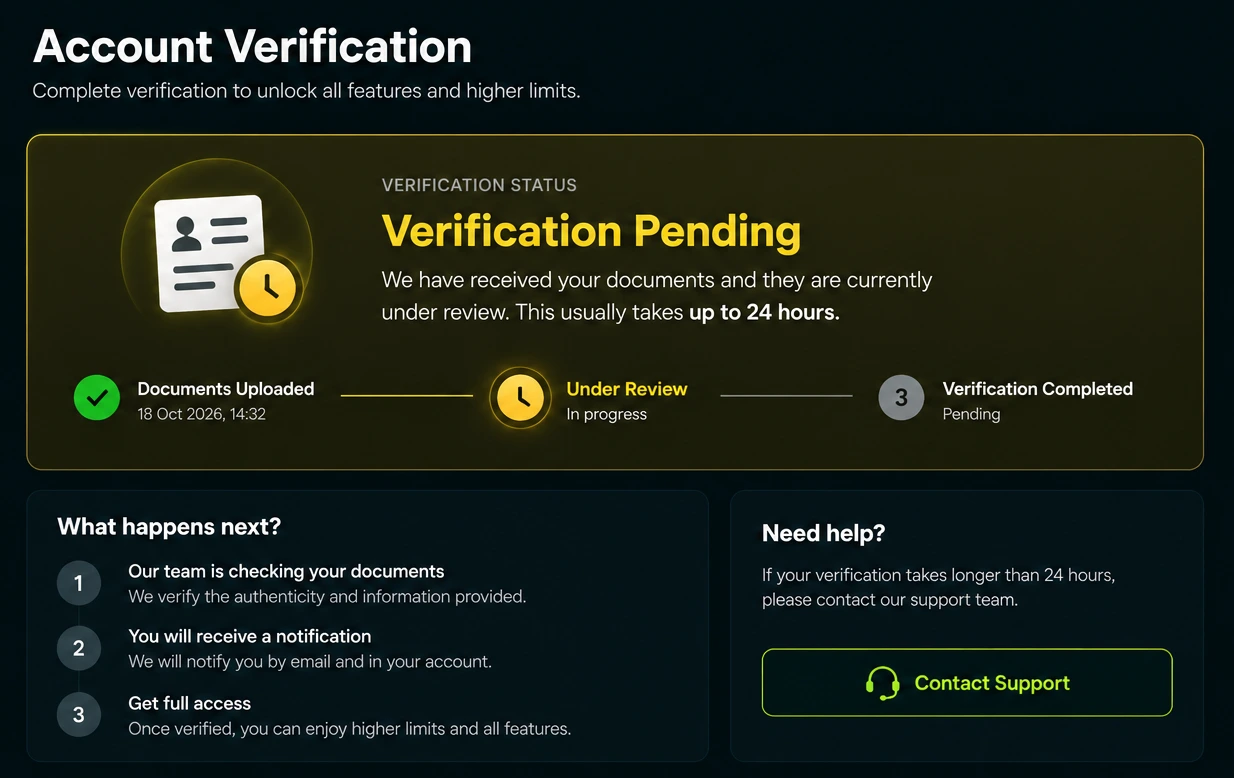
The KYC request at Kikibet is triggered when a player submits their first withdrawal. At that point, the platform requires submission of the approved identity and address documents before the withdrawal is processed. Players who have not already completed verification receive a notification prompting document submission; the withdrawal remains in a pending state until verification is approved and cleared.
The standard review period for KYC documentation is one to three business days under normal conditions. Accounts flagged for enhanced due diligence — such as those with higher withdrawal volumes or discrepancies between registration data and submitted documents — may be subject to extended review, during which additional documentation can be requested. Players in this category may also be asked to provide proof of the source of funds deposited into the account, a requirement that is standard practice at offshore operators for accounts meeting certain activity thresholds.
"The single most effective step a player can take to reduce withdrawal friction at any offshore casino is to complete KYC before the first cashout request — not during it." — payment operations specialist, 2026.
Making Your First Deposit and Activating the Welcome Bonus
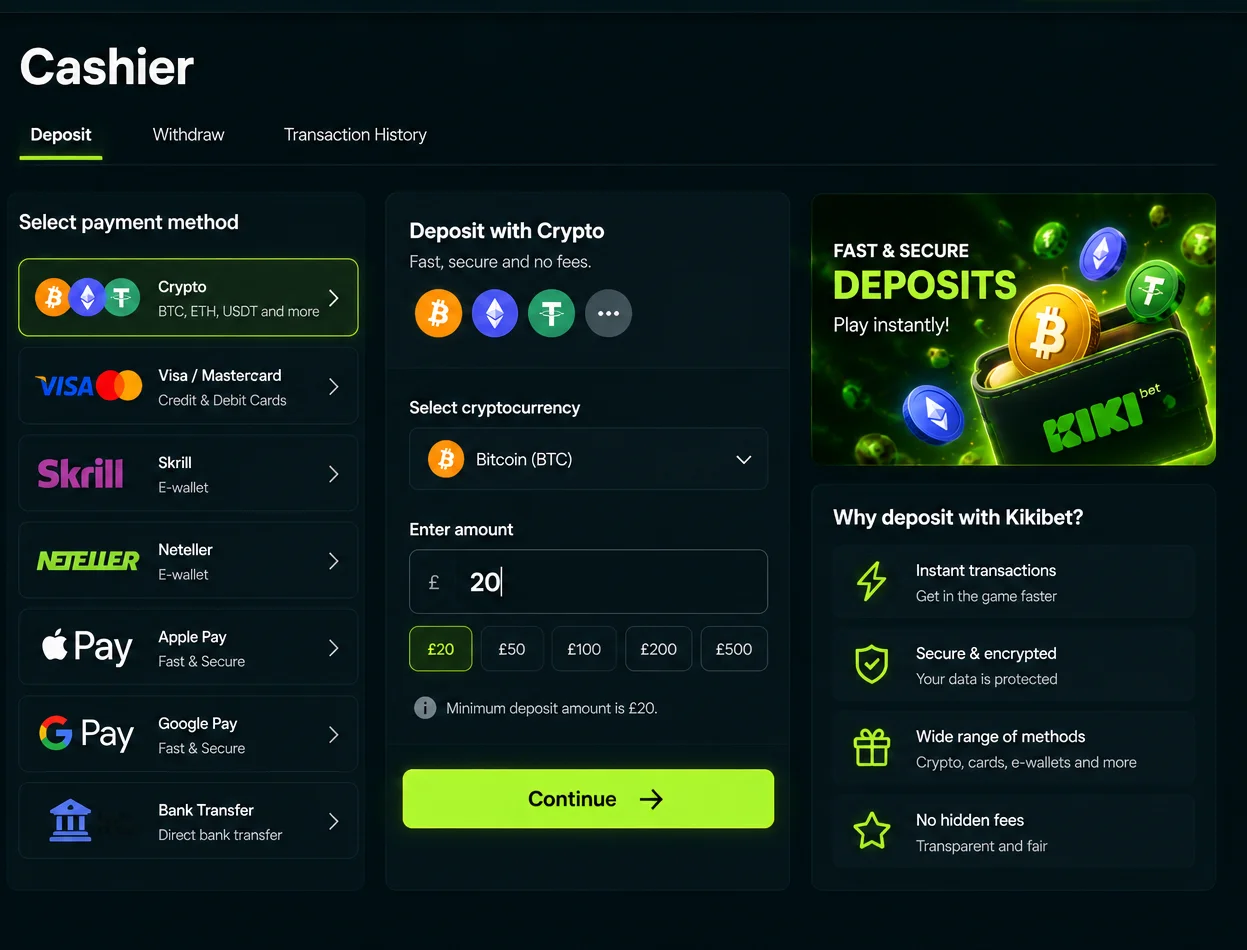
The first deposit at Kikibet is made through the cashier section, accessible from the main navigation after login. The platform supports both cryptocurrency and fiat payment methods — a range expanded significantly in August 2026 when Visa, Mastercard, Apple Pay, Google Pay, PayPal, Revolut, Trustly and additional fiat options were added alongside the existing crypto infrastructure. The minimum deposit required to activate a welcome bonus tranche is £20; deposits below this amount are credited to the account balance but do not trigger a promotional offer.
Payment method selection at this stage has a direct bearing on bonus eligibility. Deposits made via Skrill or Neteller are not eligible for the Kikibet Welcome Package or any other promotion on the platform — a restriction that applies across the full promotions calendar. All other supported payment methods, including all cryptocurrencies and the major fiat options, are eligible for bonus activation on a qualifying deposit of £20 or more.
For players depositing via cryptocurrency, the amount is converted to the account's base currency at the exchange rate in effect at the time of deposit, with the bonus calculation applied to the converted sterling equivalent. A deposit meeting the £20 minimum in any eligible currency therefore qualifies for the first Welcome Package tranche regardless of whether the original payment was made in bitcoin, ether or a fiat method. Full terms — including the 35x wagering requirement, per-tranche caps and time limits — are available on the dedicated Kikibet bonus page.
Registering on Mobile: PWA and Browser Sign-Up
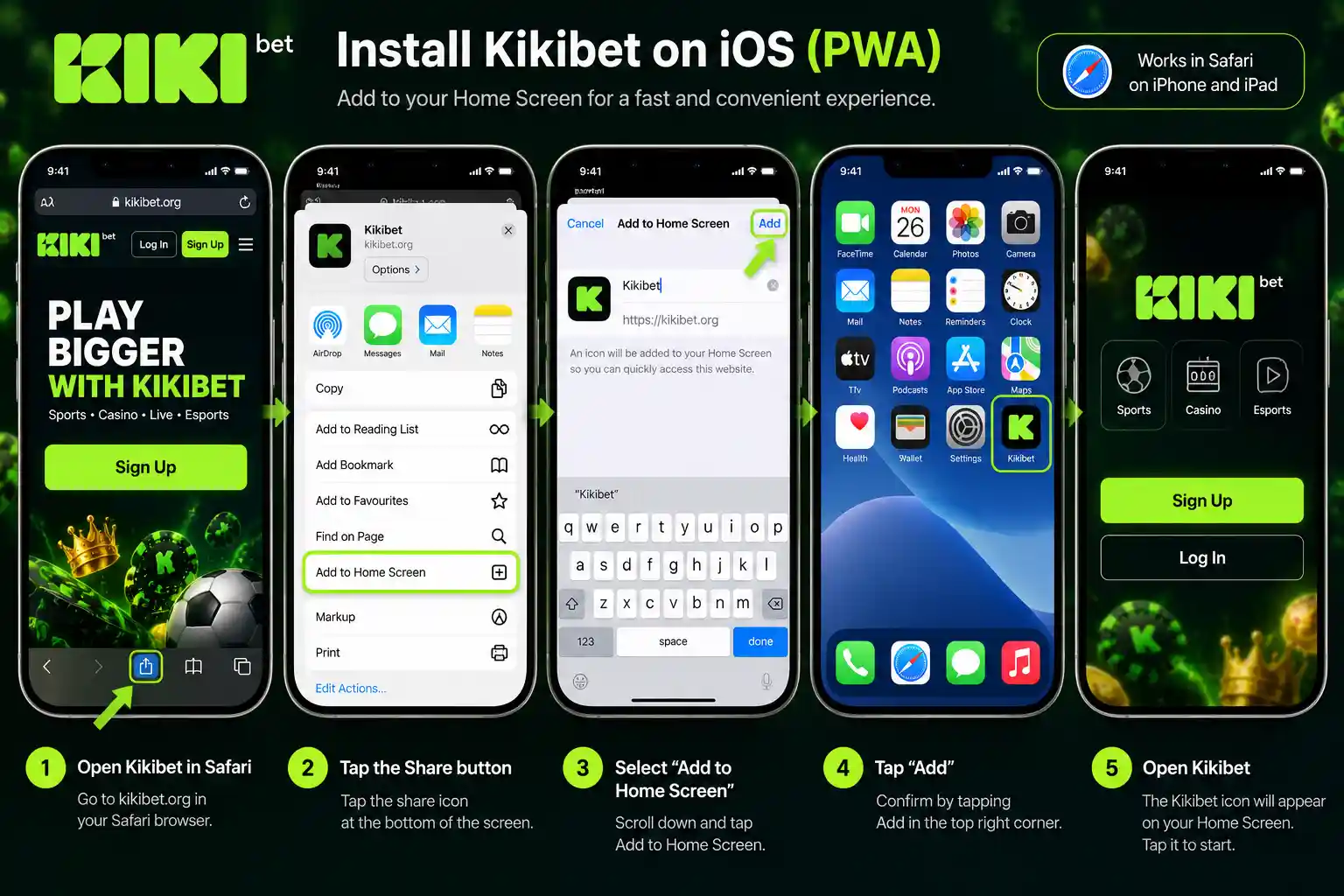
Kikibet does not offer a native application distributed through the Apple App Store or Google Play. Mobile registration and account access are delivered through a Progressive Web App (PWA) — a browser-based installation that can be added to a device home screen and operates with full-screen functionality comparable to a native app. The PWA is compatible with both iOS (via Safari) and Android (via Chrome) and requires no third-party download from outside the standard browser. Installation involves visiting the Kikibet website on a mobile browser, selecting "Add to Home Screen" from the browser menu, and confirming the prompt. The process completes in under one minute and places the Kikibet PWA on the device home screen with its own icon.
The registration form on mobile is structurally identical to the desktop version. Players signing up via the PWA or a standard mobile browser complete the same sequence — personal details, contact information, credential setup and age confirmation — with the layout adapted for smaller screen viewports. The Google and Apple authentication options are both available on mobile and represent the more practical route for smartphone users, eliminating the need to type a full password and complex credential combination on a touchscreen keyboard during the sign-up session.
Players who complete registration on desktop and subsequently switch to mobile connect to the same account through the Kikibet app PWA without re-registration. Login credentials — email and password, or the chosen Google or Apple authentication route — function identically across desktop and mobile environments.
"The PWA model removes the friction of App Store discovery and approval while delivering a near-native experience — a structurally sound choice for an offshore operator serving multiple markets simultaneously." — mobile product analyst, 2026.
Common Registration Problems and How to Resolve Them
A defined set of issues arises consistently during the Kikibet registration process, the vast majority of which are attributable to data entry errors or browser-side technical conditions rather than platform faults. Identifying the underlying cause accurately is the most efficient path to resolution — contacting live chat support with an incorrect diagnosis of the issue consistently extends rather than shortens the time to resolution. The table below outlines the most frequently encountered registration problems, their likely causes and the recommended resolution in each case.
| Problem | Likely Cause | Resolution |
|---|---|---|
| "Email already registered" error | Email address was previously used on a Kikibet account | Use a different email, or request a password reset if the account already exists |
| Verification email not received | Email delivered to spam/junk folder, or incorrect address entered during registration | Check spam folder; if not found, request a resend via the registration portal or contact live chat |
| Verification link expired | Link was not clicked within the 24–48 hour validity window | Request a new verification email from the account login screen or via live chat |
| Form submission rejected | Mandatory field incomplete, or email/phone format not accepted by platform validation | Review all mandatory fields; ensure email and phone number follow the correct format for the player's country |
| Name mismatch at KYC | Name on registration form does not match identity document exactly (e.g. nickname used instead of legal name) | Contact live chat to request a name correction on the account before resubmitting KYC documents |
| KYC document rejected | Image is blurry, cropped, partially obscured, or the submitted document is expired | Resubmit with a high-resolution, fully visible scan or photograph of a current, valid document |
| Account inaccessible after verification | Browser cookies blocked, cache conflict, or session error following account activation | Clear browser cache and cookies, try a different browser, or open a private/incognito window and attempt login again |
"The most preventable registration delay is a name mismatch between the sign-up form and the identity document — it is the issue that appears most often in operator KYC rejection logs." — identity verification specialist, 2026.
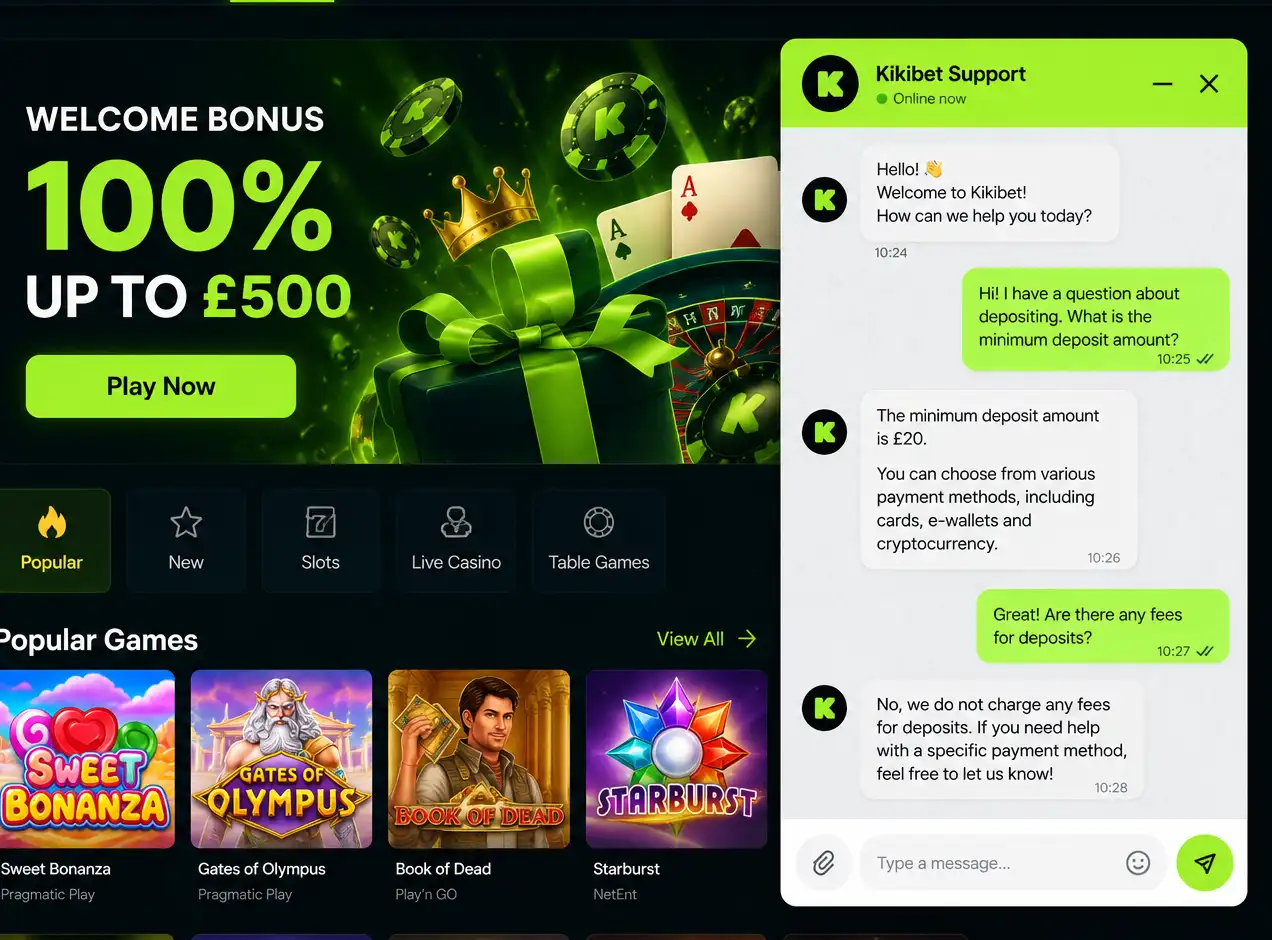
Players who encounter a problem not covered in the table, or where the listed resolution does not resolve the issue, should contact Kikibet's customer support team via live chat, accessible directly from the platform interface. Live chat is the fastest resolution channel for account access and registration queries. Email support is available as a secondary route for issues that require document submission or formal account investigation and typically resolves within one to two business days.
Frequently Asked Questions: Kikibet Registration UK
-
The registration form takes under two minutes to complete. Account activation follows email confirmation, which is typically received within a few minutes of form submission. The account is accessible immediately after clicking the verification link.
-
UK players can register at Kikibet. The platform does not apply a country restriction for United Kingdom residents. However, Kikibet holds an Anjouan Offshore Gaming Authority licence rather than a UKGC licence, which means the statutory consumer protections that apply to UKGC-regulated sites — including GamStop integration — do not extend to this platform.
-
KYC requires proof of identity (valid passport, national ID card or driver's licence) and proof of address (utility bill, bank statement or official government letter issued within the last 90 days). Both documents must show a name and address that match the details submitted on the registration form exactly.
-
KYC verification is not required at the point of registration — the account is immediately accessible after email confirmation. The verification check is triggered when a player submits their first withdrawal request. Submitting KYC documents proactively after registration avoids delays at the point of cashout.
-
The minimum qualifying deposit to activate a Welcome Package tranche at Kikibet is £20. Deposits made via Skrill or Neteller are not eligible for the promotion. All other supported payment methods — including cryptocurrencies and major fiat options — qualify on a deposit of £20 or more.
-
Kikibet registration is fully available on mobile. The platform operates through a Progressive Web App (PWA) compatible with iOS and Android, installable from the mobile browser without an App Store download. The mobile sign-up form is structurally identical to the desktop version, with Google and Apple authentication options available.
-
The verification email should be checked in the spam or junk folder first. If it is not there, the email address entered during registration may be incorrect. A new verification email can be requested through the registration portal. If the issue persists, Kikibet's live chat support can resend the confirmation or assist with correcting the registered email address.